AI Studio · Partner workspace
Bring the drawing.
Review the CAD.
Use Castable to build supported ring designs from drawings or check an existing mesh. Inspect the model, confirm the dimensions, and revise the design before your team takes it into production.
Invite only for partner factories.
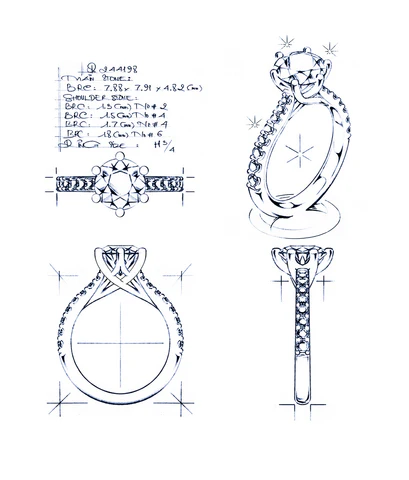 Start with the detail you have.
Keep the questions
beside the geometry.
- Form
- Inspect the model.
- Dimensions
- Confirm the interpretation.
- Factory rules
- Read the selected profile.
The workflow
Follow the design,
from input to handoff.
Start with the design
Upload a ring drawing with the dimensions you have, or bring an existing STL, OBJ, or GLB mesh. Supported drawings start a build workflow; meshes start a validation workflow.
DRAWINGS · STL · OBJ · GLBInspect the interpretation
Review the model and confirm the dimensions Castable reads. For design builds, review the selected factory profile and the checks it applies.
MODEL · DIMENSIONS · FACTORY RULESRevise, then review again
Ask for changes to a supported design in plain language. Inspect the revised geometry and read the validation report before you move on.
REQUEST · REBUILD · REVIEWBring the files to your team
Export the available STEP or STL files alongside the validation report. Your CAD and production teams review the handoff and decide the next step.
AVAILABLE EXPORTS · VALIDATION REPORT
Human review
Your team makes
the production decision.
Castable checks the rules in the selected workflow. Your team confirms the design, reviews the results, and approves the manufacturing process.
Design coverage and available exports depend on the input and build. We review fit with your team before the pilot.
How a factory pilot startsWORK WITH CASTABLE
Start with your factory's workflow.
Tell us what your CAD and production teams want to evaluate. We will discuss the scope and partner access with you.
Already invited? Open your Studio.